Automate the routine work.
Let configured workflows gather details and carry out supported tasks.

Do more with less. Keep work moving.
Turn everyday requests into clear, accountable work. PeopleTide helps teams create tasks automatically, organise queues, and see where work is getting held up—so customers get answers and your team follows through.
Routine work handled by configured workflows.
A clear ticket queue when your team needs to step in.
Review the request and give the service team a decision.
The customer’s request needs a manager’s decision before the team can proceed.
Let configured workflows gather details and carry out supported tasks.
Make responsibility, priority, and progress visible to the team.
See pending work, address delays, and follow through on what was promised.
The workflow engine behind your team
Let configured workflows handle routine steps, then bring in a person when the request needs approval, judgment or help. Your support team works from a ticket queue, focused on the problems that need their involvement.
Understand the request, gather missing information and run supported tasks within the workflow’s rules and permissions.
Carry the reason for handoff, customer context, completed actions and unfinished work into a staff ticket.
Staff review priorities, handle exceptions and decisions, and record what happened. Owners and delays stay visible.
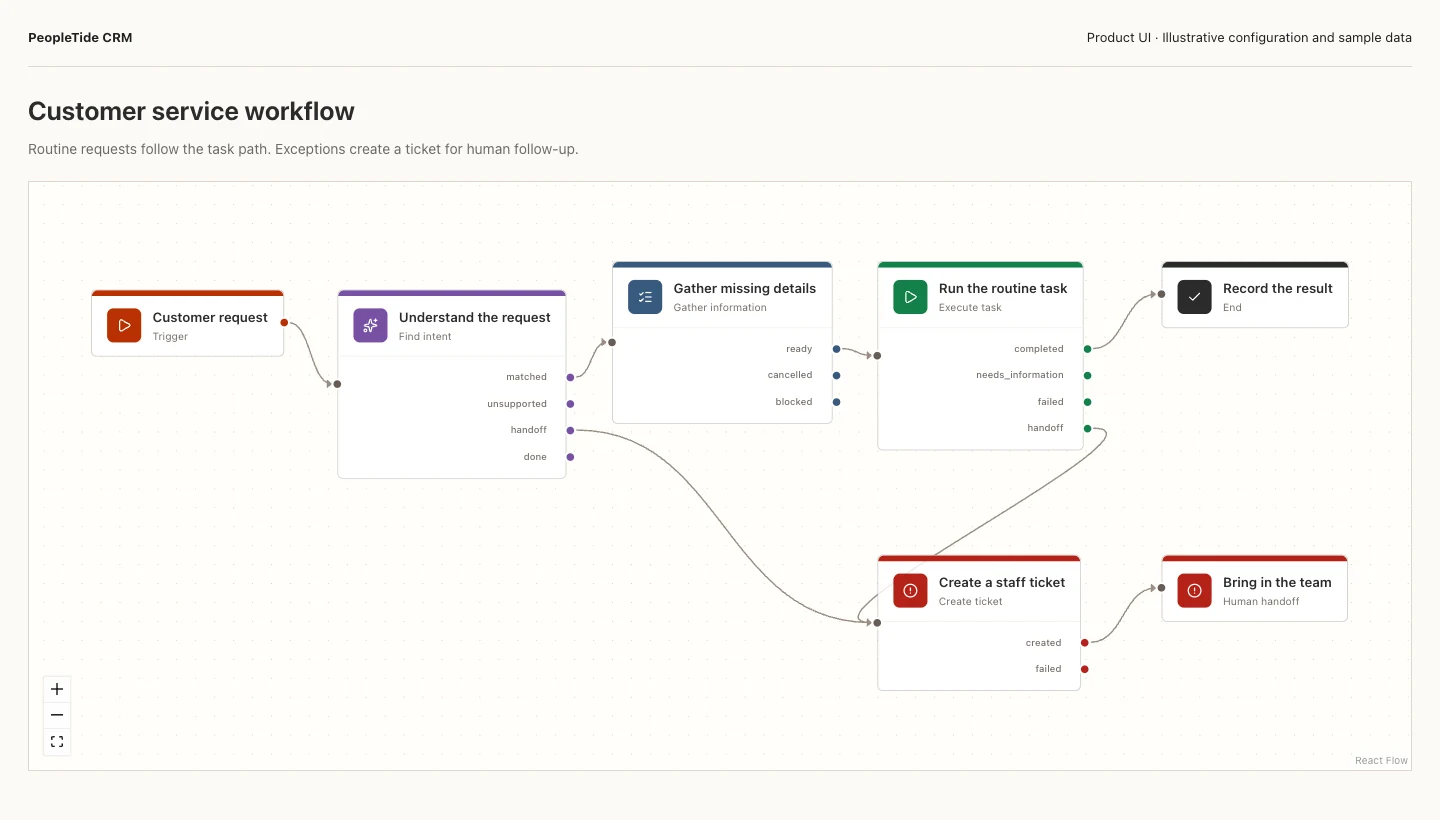
Product snapshot · Sample data
The workflow branches from task execution to a recorded result or a ticket for staff follow-up.
View full snapshot in a new tab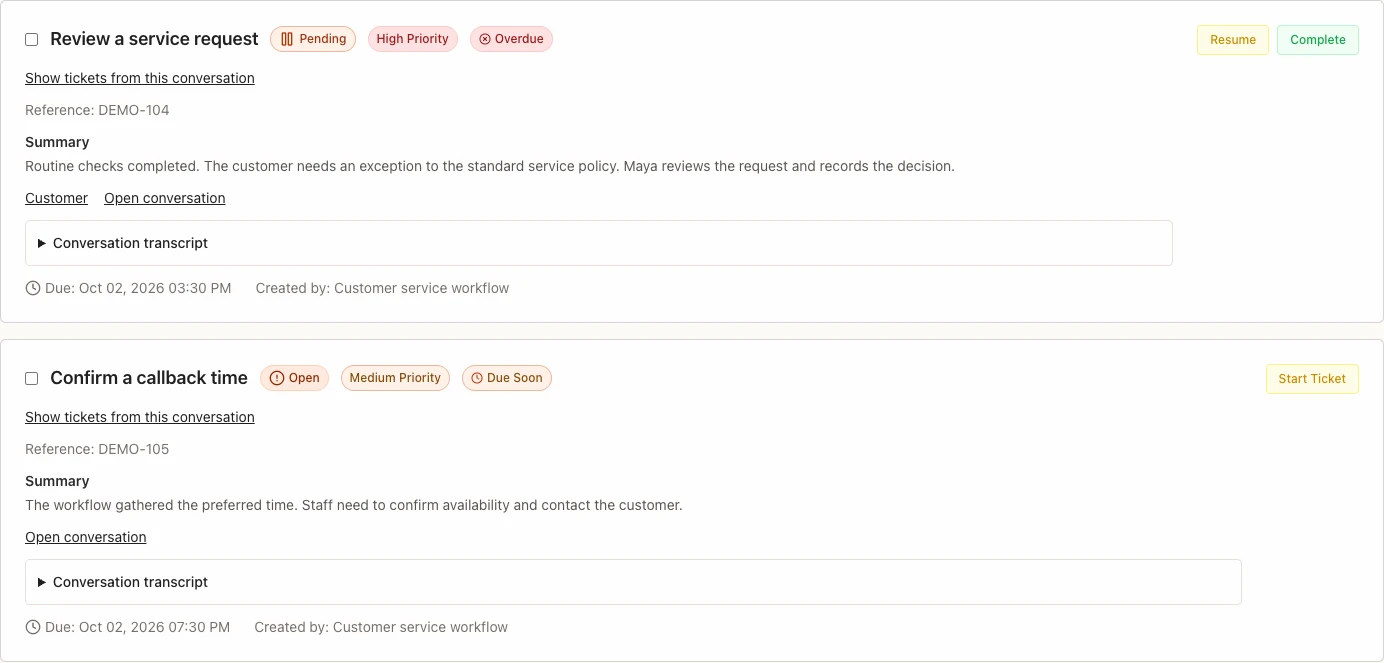
Product snapshot · Sample data
A service exception and a callback appear as tickets with status, priority, due time and customer context.
View full snapshot in a new tabSnapshots use the CRM product interface with illustrative configuration and sample data. Tasks, routing and connections require setup. Automation does not replace staff decisions or establish a guaranteed efficiency improvement.
Explore the workflow and handoffSee where work slows down
When requests are scattered, delays stay hidden. Task status, due dates, and queue views help teams see what is waiting and decide where to step in.
The task is still open. Its owner and due time make the delay visible.
Review the priority, contact the customer, and record what happened.
The customer’s concern and the outcome stay attached to the work.
The customer journey, supported by better operations
When context, ownership and the next action stay connected, your team can spend less time coordinating work and give customers a clearer answer.
Bring relevant enquiries into view.
Marketing campaign delivery and connected attribution are still being developed.
Use customer context and assign the next action.
CRM conversations and follow-ups depend on channel setup.
Confirm the booking or record the next sales step.
Scheduling supports bookings. General purchase and order connections are planned.
See pending work, resolve delays, and record what happened.
CRM tasks support follow-through. Healthcare queues are in the HMIS pilot; general fulfilment connections are planned.
Follow up on the experience and the next customer need.
Configured CRM follow-up is available; complete retention and revenue reporting is still being developed.
Illustrative example
From an enquiry to a confirmed booking and a completed follow-up.
Keep the customer’s request and available history together.
Offer a supported booking link. Keep a pending confirmation assigned to an owner.
An overdue follow-up stays visible with its owner, priority and due time.
The teammate reviews the context, contacts the customer and records the result.
Keep the completed work in the customer history for a configured follow-up.
Illustrative example. Booking and follow-up require configuration. Marketing campaign delivery and complete repeat-customer reporting are still being developed.
Illustrative example
From a product enquiry or support request to an answer and a recorded result.
Keep the product question or concern attached to the customer conversation.
Give the response or next sales step a clear owner and priority.
A response waiting for a decision or a handoff stays visible to the team.
The responsible teammate handles the approval and records what was agreed.
Keep the support outcome and next follow-up attached to the customer record.
Illustrative example. General order, payment and fulfilment connections are planned. Purchases, delivery completion and repeat sales need evidence from the systems that manage them.
Connected apps for the work behind the experience
CRM, Scheduling, Mail and Marketing support different parts of customer-facing work. HMIS adds specialist healthcare workflows. Choose the apps your team needs, with availability and setup shown for each.
Customer relationships
Available with setupConnect customer context, conversations, tasks and follow-through.
CRM capabilities are available with workspace setup. Channels and connected workflows depend on configuration and provider support.
Explore CRMBookings and availability
Self-service accessCoordinate availability and confirmed bookings through a shared booking link.
Individual accounts can get started online. Calendar connections and team features depend on setup and workspace access.
Explore SchedulingOrganisation email
Controlled pilotProvide business email and staff mailbox access within your organisation.
Available to selected organisations with domain and mailbox setup. Sending and receiving depend on verified readiness. Connected mail devices are in a restricted pilot; broader client compatibility is still being validated.
Explore MailMarketing operations
Private previewCoordinate campaign planning, audiences, landing pages and measurement in a focused workspace.
The preview uses demonstration data. Production campaign delivery, connected reporting, and provider integrations are still being developed.
Explore MarketingHealthcare operations
Facility pilotCoordinate healthcare worklists and department queues within the facility pilot.
Being tested in a working healthcare facility. Not available for general sale.
Explore HMISFrom efficient work to a measurable result
Find delays first. Then check the customer experience and the business result using evidence from the responsible system.
Overdue tasks, time waiting, handoff delays, completion time
Understand where work needs attention. Current task views show owners, due dates and status; complete account-wide timing reports are proposed.
Response time, resolution time, recorded feedback
Check what the customer experienced. A completed task alone does not establish satisfaction; consolidated reporting needs verified timing and feedback records.
Confirmed bookings, completed purchases, repeat customers
Check the result in the responsible system. A confirmed booking does not establish additional revenue; purchase and repeat-customer reporting need further connections.
These are measurement goals, not promised improvements or a live account-wide dashboard. Availability depends on the app, configuration and source evidence.
Start with one workflow
Identify the delays, the people responsible and the result you want to measure. We’re exploring a base subscription for ongoing operational value, plus agreed, verified outcomes.
Explore the pricing pilot Discuss an outcome-based pilotProposed pilot model. No fixed rates or guaranteed improvements. Capabilities depend on the app and configuration; the shared platform is not yet offered as a standalone service. Third-party integrations: planned support